Glassify - Widgets & Themes
Mahmoud ZadahPersonalization
4.7183.00 Reviews
- Version
- 1.4.5
- Installs
- 500.00K
- Age Rating
- Everyone
Screenshots
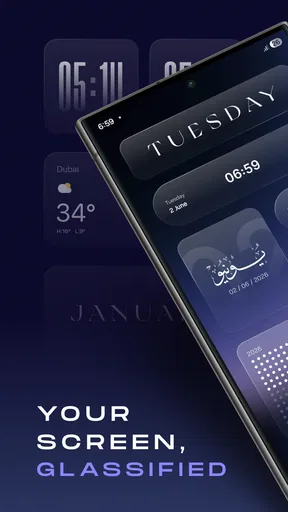
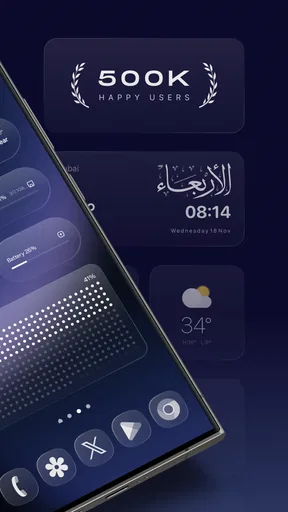
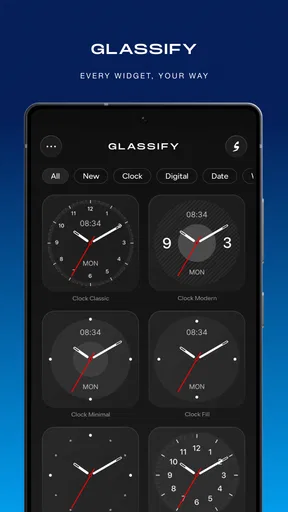
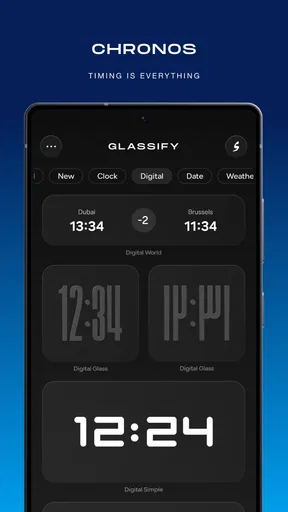
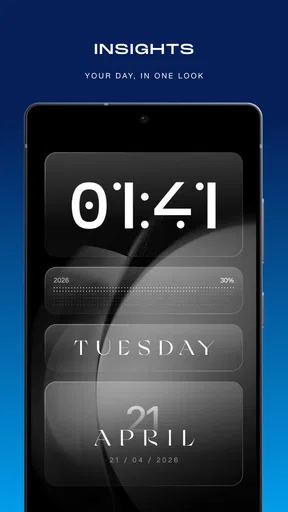
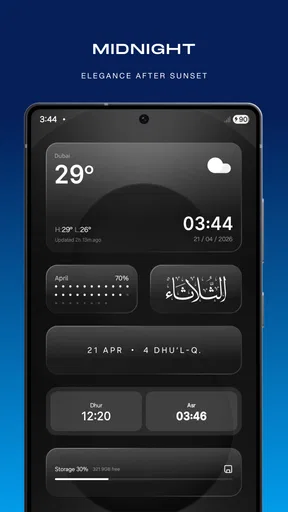
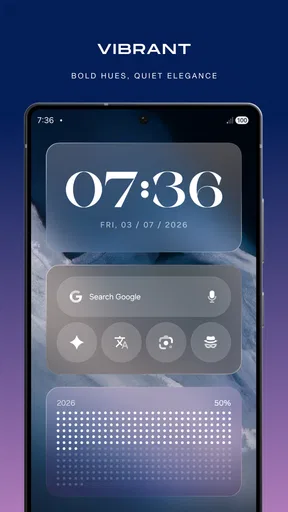
Our Review of Glassify - Widgets & Themes
 Analysis by Appyee
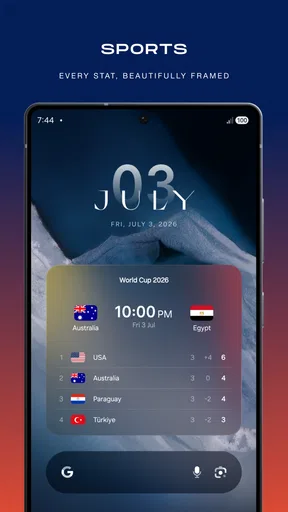
I spent time with Glassify as a personalization app, and its central idea is easy to understand: it lets you build glass-style widgets while adjusting the individual parts instead of accepting one fixed design. That sounds like a visual change, but the practical effect is bigger. A widget can either blend into a home screen or make it feel unfinished, and this app is aimed at people who want control over that relationship.
My first impression was that Glassify is less about adding decoration for its own sake and more about creating a consistent surface across the screen. The transparent, layered look can make a busy wallpaper feel calmer, while a carefully chosen arrangement can turn a plain home screen into something that feels deliberately designed. I found that the app makes the most sense when I treated the widget as part of the whole layout rather than as an isolated object.
It is free to install, with optional in-app purchases ranging from a few dollars to higher-priced individual items. The app is made by Mahmoud Zadah, carries an Everyone age rating, and has reached over half a million installs. Its current version is 1.4.5, and it requires Android 11 or later. Those details make it accessible to a broad group of Android users, although the visual result will naturally depend on the phone’s screen, wallpaper, launcher, and system styling.
Glass styling only matters when it improves the whole home screen
The most important capability here is deep adjustment of the widget itself. Instead of treating “glass” as a single preset, Glassify gives the idea room to work at the level of separate visual elements. That matters because transparency, spacing, contrast, and text treatment can each look good alone but become distracting when combined without care.
I noticed the biggest difference when I stopped trying to make every part equally visible. A glass widget usually works better when the background remains subtle and the information has a clear visual priority. For example, a clock or date should remain readable at a glance, while decorative transparency should stay in the background. The app’s value is not simply that it makes things translucent; it gives me enough control to decide where the visual emphasis belongs.
This is also why the app can appeal to people who normally avoid widget packs. Many ready-made packs are attractive in screenshots but force a particular combination of type, spacing, color, and shape. Glassify is more useful when the standard options do not quite match a wallpaper or a personal layout. I can aim for a restrained look rather than accepting a dramatic theme that takes over the screen.
The glass effect has a specific strength on uncluttered home screens. With a soft wallpaper and a small number of icons, the widget can act like a transparent panel that organizes the page without making it feel heavy. On a detailed wallpaper, however, the same effect may lose contrast. My practical advice is to choose the wallpaper first, then tune the widget around it. Designing the widget in isolation is the quickest way to end up with something attractive in the editor but difficult to read in daily use.
What the customization changes in everyday use
Customization becomes useful when it solves a small recurring annoyance. I use a home screen several times a day for quick checks, not for admiring it, so the widget has to work under different conditions. A style that looks balanced in bright indoor light may be too faint at night, and a transparent panel that fits one wallpaper may disappear after a background change.
Glassify’s detailed approach encourages a more deliberate setup. I can keep the overall glass character while changing the visual weight of the elements that need attention. That is more practical than repeatedly switching between unrelated widget packs. It also means the final result can be quieter: the design does not need loud colors or oversized decoration to feel customized.
One useful workflow is to begin with the information I check most often and build outward from there. I would place that widget where my thumb naturally reaches, then use the surrounding space for less urgent elements. After that, I would adjust the glass treatment so the primary information remains legible. This order prevents a common mistake: spending time perfecting the appearance before discovering that the widget is awkwardly placed or too subtle to read.
Another worthwhile approach is to make one change at a time. When several visual controls are adjusted together, it becomes difficult to tell which choice improved the result and which introduced clutter. Glassify is best enjoyed patiently. Its flexibility is an advantage, but flexibility also creates more decisions than a simple preset-based app.
That is the main practical distinction between this app and ordinary system widgets. System widgets are usually quick and dependable, but their appearance is tied closely to the launcher or the app that provides them. Glassify gives the home screen a more unified visual language. The trade-off is that I have to invest more effort before the screen feels finished.
A realistic morning setup
Imagine starting the day with a wallpaper that has a pale gradient and a few dark details. A conventional opaque widget may cover too much of it, while a completely transparent one may let the background compete with the information. A carefully tuned glass widget can sit between those extremes: the wallpaper remains visible, but the content gets a defined area.
In that situation, I would use the glass surface to separate the widget from the wallpaper without turning it into a solid block. The key is to preserve enough contrast for a quick glance. If the text becomes difficult to read, the design has failed no matter how polished it looks. This is where Glassify’s element-level approach has a real benefit: I can prioritize usability instead of choosing between an attractive preset and a plain system alternative.
Later, if I switch to a darker wallpaper, I would not necessarily rebuild the entire home screen. I would first adjust the widget’s visual balance and check it in the actual launcher. That makes the app more valuable for people who change wallpapers often. The same customization that helps with an initial setup can also reduce the need to redesign everything after a seasonal or personal change.
For a work-focused screen, I would keep the design restrained and avoid placing too many glass elements beside one another. A single strong widget can create order; several competing panels can make the screen feel like a dashboard. Glassify gives enough freedom to create either result, so the quality of the outcome depends heavily on restraint.
Where the visual freedom becomes friction
The obvious limitation is that deep customization takes time. Someone who wants to install a widget, choose a preset, and move on may find the process slower than expected. This is not a flaw in the concept, but it is an important distinction. Glassify is aimed at shaping a look, not merely filling an empty space on the home screen.
There is also a readability trade-off built into the glass style. Transparency can make a layout feel lighter, but it can also reduce contrast against complex images. Users with visually busy wallpapers may need to simplify the background or make the widget more prominent than they originally wanted. If your priority is maximum legibility in every situation, a solid, conventional widget may be the better choice.
Another point is consistency. A customized glass widget can look excellent beside matching icons and wallpaper, but it may feel out of place if the rest of the home screen follows a completely different visual style. The app can improve cohesion, but it cannot automatically make unrelated elements agree. I would think of it as one part of a design system rather than a complete replacement for every personalization tool.
The optional purchases also deserve a practical mention. The app is free to start, which makes it easy to test the basic experience before deciding whether it belongs on your phone. Some users will be comfortable paying for additional individual items, while others will prefer to stay with what is available without spending. The right question is not whether customization exists, but whether the extra choices are meaningful enough for your particular setup.
Because the app requires Android 11 or later, older devices are outside its supported range. On a compatible phone, the result can still vary with the launcher and the screen itself. That is normal for home-screen personalization: a widget is not viewed in a vacuum, and a design that feels balanced on one display may need small adjustments on another.
Who will get the most from Glassify?
I would recommend Glassify most strongly to people who care about the relationship between wallpaper, widgets, and empty space. It suits users who notice small alignment problems, dislike mismatched widget packs, or want a softer alternative to bright, opaque panels. It is also a good fit for anyone who enjoys refining a home screen over time rather than treating customization as a one-minute task.
It can be especially useful for a minimalist setup. Minimalism is not just removing icons; it is making the remaining elements feel intentional. A glass widget can provide structure without visually filling the entire page, provided the settings preserve contrast. In my experience, the best results came from using fewer elements and giving each one enough room to breathe.
People who frequently change wallpapers may also appreciate the control. Instead of abandoning a favorite widget whenever the background changes, they can adapt the visual treatment to the new image. This is a small but meaningful advantage over fixed designs, particularly for users who like experimenting with themes.
I would be less enthusiastic about recommending it to someone who wants a completely functional, no-tuning home screen. If the goal is simply to see information quickly and never revisit the layout, the usual system widgets are more direct. Likewise, users who prefer bold, highly colorful themes may find the glass approach too restrained unless they are willing to push the styling further.
The app’s 4.7 average from around ten thousand ratings suggests that its concept has connected with a substantial audience, and the review count is in the hundreds. I would still treat that as a starting point rather than a guarantee that every setup will look perfect. Personalization apps are unusually dependent on taste and context: the same level of control that delights one person can feel like unnecessary work to another.
My approach to getting a better result
I would begin with a clean home-screen page and one widget, not a full collection. That makes it easier to judge whether the glass treatment improves the layout or merely adds another layer. Once the first widget feels readable and well placed, I would add anything else only if it serves a clear purpose.
I would also check the result from a distance and during normal movement, not just while editing. A widget can appear perfectly legible when I am staring directly at it but become too faint when I glance at the phone quickly. This simple test exposes whether the transparency is helping or hurting.
For a wallpaper with detailed artwork, I would favor stronger separation between the widget and the background. For a plain gradient or solid color, I would use the glass effect more gently so the screen does not become visually flat. This is one of the app’s most important trade-offs: the best setting is not universal, and copying someone else’s theme may produce a worse result on your device.
I would save the most ambitious experiments for a secondary home-screen page. That gives me a practical main page while leaving room to explore more expressive combinations. It is a good way to enjoy the creative side of Glassify without making everyday navigation dependent on a design that is still being tested.
My final view after using it
Glassify succeeds because it focuses on a clear capability and gives that capability enough depth to matter. The glass look is not automatically useful, but the ability to adjust the widget’s individual elements makes it possible to turn a fashionable effect into a functional part of the home screen. When the styling is matched to the wallpaper and kept readable, the result feels calmer and more personal than a collection of unrelated presets.
I would not choose it for a purely practical setup or for anyone unwilling to spend time refining details. The app asks the user to make design decisions, and its transparency can create readability problems when the background is too busy. Those are genuine limitations, not reasons to dismiss it. They simply define the audience that will enjoy it most.
For me, the strongest reason to try it is the balance between visual freedom and a recognizable style. It does not force every home screen to look identical, yet the glass treatment gives the customization a common direction. If you want your Android layout to feel considered, enjoy adjusting small details, and are comfortable testing the result against your own wallpaper, Glassify is a convincing free starting point. Its best feature is not the glass effect alone, but the control to make that effect work for your screen.
Verdict
Strengths of Glassify - Widgets & Themes
- Wide selection of widgets for personalizing your home screen.
- Theme combinations make it easy to create a consistent visual style.
- Customization options support different wallpaper and icon setups.
- Regular content updates can add fresh designs and seasonal styles.
- Preview tools help you check layouts before applying changes.
Limitations of Glassify - Widgets & Themes
- Some premium widgets and themes require a subscription or one-time payment.
- Certain designs may use more battery because of frequent updates.
- Compatibility can vary between Android and iOS home-screen features.
- Applying several widgets may require manual resizing and repositioning.
- The large catalog can make finding a specific style time-consuming.
Similar Picks in This Category
View All
Microsoft SwiftKey AI Keyboard
SwiftKey4.3

Wallpapers
Google LLC4.1

Zedge™ Wallpapers & Ringtones
Zedge4.7

Yandex Browser with Alice AI
Direct Cursus Computer Systems Trading LLC4.3

Ringtone Maker:create ringtone
Big Bang Inc.4.7

Fonts Keyboard
Fonts Keyboard3.9
Frequently Asked Questions
What is Glassify - Widgets & Themes?
Glassify - Widgets & Themes is a customization app designed to refresh the appearance of your mobile device with themed widgets and visual elements. It may include options for clocks, calendars, weather, batteries, photos, and other home-screen tools, depending on your device and the available theme collection. The app is aimed at users who want a more polished, coordinated, or glass-inspired interface without manually designing every widget from scratch.
Is Glassify compatible with both Android and iPhone?
Compatibility depends on the version of Glassify available for your platform. Android and iOS handle widgets, themes, icons, and home-screen customization differently, so some features may not work in exactly the same way on both systems. Before downloading, check the app-store listing for supported operating-system versions, device requirements, and feature limitations. Older phones may also offer fewer customization options than newer models.
Does Glassify - Widgets & Themes cost money?
Glassify may offer a free download with a selection of basic widgets or themes, while additional designs can require in-app purchases or a subscription. Pricing, trial periods, and available content can change over time, so it is important to review the current store listing before confirming payment. If a subscription is offered, check its renewal terms and cancel it through your device’s app-store settings if you no longer want continued access.
How difficult is it to set up widgets and themes with Glassify?
The setup process is generally intended to be accessible to beginners: choose a design, customize available details, save it, and add the widget through your phone’s home-screen tools. However, the exact steps vary between Android and iOS, and some widgets may require permissions or manual placement. Users should also expect to spend a little time adjusting sizes, backgrounds, colors, and spacing to achieve a clean result on their particular screen.
Does Glassify affect privacy, battery life, or phone performance?
As with any customization app, Glassify may request permissions related to notifications, photos, weather information, or other widget functions. Review these requests carefully and allow only what is necessary for the features you plan to use. Static widgets usually have limited impact, but frequently updating weather, battery, or animated elements may use additional battery or data. If performance changes, remove unused widgets and disable unnecessary background updates.
